Rails 使用 Rails 构建 API 实践
我是来鼓吹使用 Rails 写 API 的。 原文在此:<https://labs.kollegorna.se/blog/2015/04/buildanapinow/ 原文有一个很大的缺陷就是读者无法按照它的步骤一步一步的去实现一个可以运行的 demo, 这对经验丰富的开发 者可能不算是一个问题,但是对刚刚接触这方面知
我是来鼓吹使用 Rails 写 API 的。 原文在此:<https://labs.kollegorna.se/blog/2015/04/build-an-api-now/> 原文有一个很大的缺陷就是读者无法按照它的步骤一步一步的去实现一个可以运行的 demo, 这对经验丰富的开发 者可能不算是一个问题,但是对刚刚接触这方面知识的新手来说却是一个很大的遗憾,软件开发方面的知识重在 实践,只有动手做了,才能对知识掌握地更加牢靠,才能更好地在工作中去使用这些知识,所以我对原文的内容 做了一些补充修整,以期能够让读者边读边思考边实践。 原文的 demo 是一个类微博应用,为简单起见我们只使用 User 和 Micropost 模型,并且我们不使用 ActiveModel::Serializer, 而是使用 Jbuilder 作为 json 模版。 首先建立一个项目:build-an-api-rails-demo
$ rails new build-an-api-rails-demo
加入第一个 API resource
BaseController
生成控制器:
# 我们不需要生成资源文件
$ bundle exe rails g controller api/v1/base --no-assets
app/controllers/api/v1/base_controller.rb,
class Api::V1::BaseController < ApplicationController
# disable the CSRF token
protectfromforgery with: :null_session
# disable cookies (no set-cookies header in response)
beforeaction :destroysession
# disable the CSRF token
skipbeforeaction :verifyauthenticitytoken
def destroy_session
request.session_options[:skip] = true
end
end
在 BaseController 里我们禁止了 CSRF token 和 cookies
配置路由:
config/routes.rb,
namespace :api do
namespace :v1 do
resources :users, only: [:index, :create, :show, :update, :destroy]
# 原文有 microposts, 我们现在把它注释掉
# resources :microposts, only: [:index, :create, :show, :update, :destroy]
end
end
Api::V1::UsersController
生成控制器:
# 我们不需要生成资源文件
$ bundle exe rails g controller api/v1/users --no-assets
app/controllers/api/v1/users_controller.rb,
class Api::V1::UsersController < Api::V1::BaseController
def show
@user = User.find(params[:id])
# 原文使用 Api::V1::UserSerializer
# 我们现在使用 app/views/api/v1/users/show.json.jbuilder
# render(json: Api::V1::UserSerializer.new(user).to_json)
end
end
app/views/api/v1/users/show.json.jbuilder,
json.user do
json.(@user, :id, :email, :name, :activated, :admin, :createdat, :updatedat)
end
User 模型和 users 表
$ bundle exe rails g model User
app/models/user.rb,
class User < ActiveRecord::Base
end
db/migrate/20150502072954createusers.rb,
class CreateUsers < ActiveRecord::Migration
def change
create_table :users do |t|
t.string :email
t.string :name
t.datetime :activated
t.boolean :admin, default: false
t.timestamps null: false
end
end
end
数据迁移:
$ bundle exe rake db:migrate
种子数据: db/seeds.rb,
users = User.create([
{
email: 'test-user-00@mail.com',
name: 'test-user-00',
activated: DateTime.now,
admin: false
},
{
email: 'test-user-01@mail.com',
name: 'test-user-01',
activated: DateTime.now,
admin: false
}
])
创建种子数据:
$ bundle exe rake db:seed
现在我们可以测试一下 api 是否正常工作,我们可以先查看下相关 api 的路由,
$ bundle exe rake routes
输出:
Prefix Verb URI Pattern Controller#Action
apiv1users GET /api/v1/users(.:format) api/v1/users#index
POST /api/v1/users(.:format) api/v1/users#create
apiv1user GET /api/v1/users/:id(.:format) api/v1/users#show
PATCH /api/v1/users/:id(.:format) api/v1/users#update
PUT /api/v1/users/:id(.:format) api/v1/users#update
DELETE /api/v1/users/:id(.:format) api/v1/users#destroy
启动 rails 服务,
$ bundle exe rails s
使用 curl 请求 api,
$ curl -i http://localhost:3000/api/v1/users/1.json
{"user":{"id":1,"email":"test-user-00@mail.com","name":"test-user-00","activated":"2015-05-02T07:47:14.697Z","admin":false,"createdat":"2015-05-02T07:47:14.708Z","updatedat":"2015-05-02T07:47:14.708Z"}}
恭喜,我们的 api 工作正常!
增加认证 (Authentication)
认证的过程是这样的:用户把她的用户名和密码通过 HTTP POST 请求发送到我们的 API (在这里我们使用 sessions 端点来处理这个请求), 如果用户名和密码匹配,我们 会把 token 发送给用户。这个 token 就是用来证明用户身份的凭证。然后在以后的每个请求中,我们都通过这个 token 来查找用户,如果没有找到用户则返回 401 错误。
给 User 模型增加 authentication_token 属性
$ bundle exe rails g migration addauthenticationtokentousers
db/migrate/20150502123451addauthenticationtokento_users.rb
class AddAuthenticationTokenToUsers < ActiveRecord::Migration
def change
addcolumn :users, :authenticationtoken, :string
end
end
$ bundle exe rake db:migrate
生成 authentication_token
app/models/user.rb,
class User < ActiveRecord::Base
- beforecreate :generateauthentication_token
- def generateauthenticationtoken
- loop do
- self.authentication_token = SecureRandom.base64(64)
- break if !User.findby(authenticationtoken: authentication_token)
- end
- end
- def resetauthtoken!
- generateauthenticationtoken
- save
- end
end
和原文相比,我给 User 模型增加了一个 reset_auth_token! 方法,我这样做的理由主要有以下几点:
- 我觉得需要有一个方法帮助用户重置 authentication token, 而不仅仅是在创建用户时生成 authenticeation token;
- 如果用户的 token 被泄漏了,我们可以通过
reset_auth_token!方法方便地重置用户 token;
sessions endpoint
生成 sessions 控制器,
# 我们不需要生成资源文件
$ bundle exe rails g controller api/v1/sessions --no-assets
create app/controllers/api/v1/sessions_controller.rb
invoke erb
create app/views/api/v1/sessions
invoke test_unit
create test/controllers/api/v1/sessionscontrollertest.rb
invoke helper
create app/helpers/api/v1/sessions_helper.rb
invoke test_unit
app/controllers/api/v1/sessions_controller.rb,
class Api::V1::SessionsController < Api::V1::BaseController
def create
@user = User.findby(email: createparams[:email])
if @user && @user.authenticate(create_params[:password])
self.current_user = @user
# 我们使用 jbuilder
# render(
# json: Api::V1::SessionSerializer.new(user, root: false).to_json,
# status: 201
# )
else
return api_error(status: 401)
end
end
private
def create_params
params.require(:user).permit(:email, :password)
end
end
现在我们还需要做一些原文没有提到的工作:
- 给 User 模型增加和 password 相关的属性;
- 给数据库中已存在的测试用户增加密码和 authentication token;
- 实现和 current_user 相关的方法;
- 实现 app/views/api/v1/sessions/create.json.jbuilder;
- 配置和 sessions 相关的路由;
给 User 模型增加和 password 相关的属性
在 Gemfile 里将 gem 'bcrypt' 这一行的注释取消
# Use ActiveModel hassecurepassword
gem 'bcrypt', '~> 3.1.7'
app/models/user.rb,
class User < ActiveRecord::Base
- hassecurepassword
end
给 User 模型增加 password_digest 属性,
$ bundle exe rails g migration addpassworddigesttousers
db/migrate/20150502134614addpassworddigestto_users.rb,
class AddPasswordDigestToUsers < ActiveRecord::Migration
def change
addcolumn :users, :passworddigest, :string
end
end
$ bundle install
$ bundle exe rake db:migrate
给数据库中已存在的测试用户增加密码和 authentication token
这个任务可以在 rails console 下完成, 首先启动 rails console,
$ bundle exe rails c
然后在 rails console 里执行,
User.all.each {|user|
user.password = '123123'
user.resetauthtoken!
}
实现和 current_user 相关的方法
app/controllers/api/v1/base_controller.rb,
class Api::V1::BaseController < ApplicationController
- attraccessor :currentuser
end
实现 app/views/api/v1/sessions/create.json.jbuilder
app/views/api/v1/sessions/create.json.jbuilder,
json.session do
json.(@user, :id, :name, :admin)
json.token @user.authentication_token
end
配置和 sessions 相关的路由
Rails.application.routes.draw do
namespace :api do
namespace :v1 do
- resources :sessions, only: [:create]
end
end
end
现在我们做一个测试看是否能够顺利地拿到用户的 token, 我们使用下面的用户作为测试用户:
{
email: 'test-user-00@mail.com',
name: 'test-user-00'
}
$ curl -i -X POST -d "user[email]=test-user-00@mail.com&user[password]=123123" http://localhost:3000/api/v1/sessions.json
{"session":{"id":1,"name":"test-user-00","admin":false,"token":"izrFiion7xEe2ccTj0v0mOcuNoT3FvpPqI31WLSCEBLvuz4xSr0d9+VI2+xVvAJjECIoju5MaoytEcg6Md773w=="}}
我们顺利地拿到了 token。 我们再做一个验证失败的测试。 我们使用一个错误的密码:fakepwd
curl -i -X POST -d "user[email]=test-user-00@mail.com&user[password]=fakepwd" http://localhost:3000/api/v1/sessions.json
糟糕系统出错了:
NoMethodError (undefined method `api_error' for #<Api::V1::SessionsController:0x007fead422c178>):
app/controllers/api/v1/sessions_controller.rb:14:in `create'
原来我们没有实现 apierror 这个方法,那我们现在就实现 apierror 这个方法。 app/controllers/api/v1/base_controller.rb,
class Api::V1::BaseController < ApplicationController
- def api_error(opts = {})
- render nothing: true, status: opts[:status]
- end
end
继续测试:
curl -i -X POST -d "user[email]=test-user-00@mail.com&user[password]=fakepwd" http://localhost:3000/api/v1/sessions
HTTP/1.1 401 Unauthorized
X-Frame-Options: SAMEORIGIN
X-Xss-Protection: 1; mode=block
X-Content-Type-Options: nosniff
Content-Type: text/plain; charset=utf-8
Cache-Control: no-cache
X-Request-Id: a5349b47-d756-4830-84f8-0653577f936d
X-Runtime: 0.319768
Server: WEBrick/1.3.1 (Ruby/2.1.2/2014-05-08)
Date: Sat, 02 May 2015 14:41:55 GMT
Content-Length: 0
Connection: Keep-Alive
此时服务器返回了 401 Unauthorized
Authenticate User
在前面的测试中,我们已经成功地拿到了用户的 token, 那么现在我们把 token 和 email 发给 API 看能否成功识别出用户。 首先在 Api::V1::BaseController 里实现 authenticate_user! 方法: app/controllers/api/v1/base_controller.rb,
class Api::V1::BaseController < ApplicationController
- def authenticate_user!
- token, options = ActionController::HttpAuthentication::Token.tokenandoptions(request)
- user_email = options.blank?? nil : options[:email]
- user = useremail && User.findby(email: user_email)
- if user && ActiveSupport::SecurityUtils.securecompare(user.authenticationtoken, token)
- self.current_user = user
- else
- return unauthenticated!
- end
- end
end
ActionController::HttpAuthentication::Token 是 rails 自带的方法,可以参考 rails 文档 了解其详情。 当我们通过 useremail 拿到 user 后,通过 `ActiveSupport::SecurityUtils.securecompare 对 user.authentication_token 和从请求头里取到的 token 进行比较,如果匹配则认证成功,否则返回 unauthenticated!。这里使用了 secure_compare` 对字符串进行比较,是为了防止时序攻击 (timing attack) 我们构造一个测试用例,这个测试用例包括以下一些步骤:
- 用户登录成功,服务端返回其 email, token 等数据
- 用户请求 API 更新其 name, 用户发送的 token 合法,更新成功
- 用户请求 API 更新其 name, 用户发送的 token 非法,更新失败
为了让用户能够更新其 name, 我们需要实现 user update API, 并且加入 before_action :authenticate_user!, only: [:update] app/controllers/api/v1/users_controller.rb,
class Api::V1::UsersController < Api::V1::BaseController
- beforeaction :authenticateuser!, only: [:update]
- def update
- @user = User.find(params[:id])
- @user.updateattributes(updateparams)
- end
- private
- def update_params
- params.require(:user).permit(:name)
- end
end
app/views/api/v1/users/update.json.jbuilder,
json.user do
json.(@user, :id, :name)
end
现在我们进行测试,测试用户是:
{
id: 1,
email: 'test-user-00@mail.com',
name: 'test-user-00',
authentication_token: 'izrFiion7xEe2ccTj0v0mOcuNoT3FvpPqI31WLSCEBLvuz4xSr0d9+VI2+xVvAJjECIoju5MaoytEcg6Md773w=='
}
$ curl -i -X PUT -d "user[name]=gg-user" \
--header "Authorization: Token token=izrFiion7xEe2ccTj0v0mOcuNoT3FvpPqI31WLSCEBLvuz4xSr0d9+VI2+xVvAJjECIoju5MaoytEcg6Md773w==, \
email=test-user-00@mail.com" \
http://localhost:3000//api/v1/users/1
{"user":{"id":1,"name":"gg-user"}}
我们看到 user name 已经成功更新为 gg-user。 读者们请注意:你们自己测试时需要将 token 换为你们自己生成的 token。 我们使用一个非法的 token 去请求 API, 看看会发生什么状况。
curl -i -X PUT -d "user[name]=bb-user" \
--header "Authorization: Token token=invalid token, \
email=test-user-00@mail.com" \
http://localhost:3000//api/v1/users/1
服务器出现错误:
NoMethodError (undefined method `unauthenticated!' for #<Api::V1::UsersController:0x007fead6108d80>)
接下来我们实现 unauthenticated! 方法。 app/controllers/api/v1/base_controller.rb,
class Api::V1::BaseController < ApplicationController
- def unauthenticated!
- api_error(status: 401)
- end
end
继续上面的测试:
curl -i -X PUT -d "user[name]=bb-user" \
--header "Authorization: Token token=invalid token, \
email=test-user-00@mail.com" \
http://localhost:3000//api/v1/users/1
HTTP/1.1 401 Unauthorized
X-Frame-Options: SAMEORIGIN
X-Xss-Protection: 1; mode=block
X-Content-Type-Options: nosniff
Content-Type: text/plain; charset=utf-8
Cache-Control: no-cache
X-Request-Id: 8cf07968-1fd0-4041-866a-ddea49af11d3
X-Runtime: 0.005578
Server: WEBrick/1.3.1 (Ruby/2.1.2/2014-05-08)
Date: Sun, 03 May 2015 05:51:52 GMT
Content-Length: 0
Connection: Keep-Alive
服务器返回 401 Unauthorized, 并且 user name 没有被更新。
增加授权 (Authorization)
上面的测试有个问题,就是当前登录的用户可以把其他用户的 name 更新,这个应该是不被允许的,所以我们 还需要增加一个权限认证的机制。在这里我们使用 Pundit 来 实现权限认证。
安装 pundit
Gemfile,
- gem 'pundit'
$ bundle install
app/controllers/api/v1/base_controller.rb,
class Api::V1::BaseController < ApplicationController
- include Pundit
end
$ bundle exe rails g pundit:install
create app/policies/application_policy.rb
将 policies 目录放到 rails 的自动加载路径中: config/application.rb,
module BuildAnApiRailsDemo
class Application < Rails::Application
- config.autoload_paths << Rails.root.join('app/policies')
end
end
创建和 user 相关的权限机制
app/policies/user_policy.rb,
class UserPolicy < ApplicationPolicy
def show?
return true
end
def create?
return true
end
def update?
return true if user.admin?
return true if record.id == user.id
end
def destroy?
return true if user.admin?
return true if record.id == user.id
end
class Scope < ApplicationPolicy::Scope
def resolve
scope.all
end
end
end
使用 UserPolicy
app/controllers/api/v1/users_controller.rb,
class Api::V1::UsersController < Api::V1::BaseController
def update
@user = User.find(params[:id])
- return apierror(status: 403) if !UserPolicy.new(currentuser, @user).update?
@user.updateattributes(updateparams)
end
end
测试:
$ curl -i -X PUT -d "user[name]=gg-user" \
--header "Authorization: Token token=izrFiion7xEe2ccTj0v0mOcuNoT3FvpPqI31WLSCEBLvuz4xSr0d9+VI2+xVvAJjECIoju5MaoytEcg6Md773w==, \
email=test-user-00@mail.com" \
http://localhost:3000//api/v1/users/2.json
HTTP/1.1 403 Forbidden
X-Frame-Options: SAMEORIGIN
X-Xss-Protection: 1; mode=block
注意我们测试的 url 地址是 <http://localhost:3000//api/v1/users/2>, 也就是说我们在更新 id 为 2 的那个用户的 name。此时服务器返回的是 403 Forbidden。 pundit 提供了更简便的 authorize 方法为我们做权限认证的工作。
class Api::V1::UsersController < Api::V1::BaseController
def update
@user = User.find(params[:id])
# return apierror(status: 403) if !UserPolicy.new(currentuser, @user).update?
- authorize @user, :update?
@user.updateattributes(updateparams)
end
end
测试:
$ curl -i -X PUT -d "user[name]=gg-user" \
--header "Authorization: Token token=izrFiion7xEe2ccTj0v0mOcuNoT3FvpPqI31WLSCEBLvuz4xSr0d9+VI2+xVvAJjECIoju5MaoytEcg6Md773w==, \
email=test-user-00@mail.com" \
http://localhost:3000//api/v1/users/2.json
此时服务器报 Pundit::NotAuthorizedError 错误,
Pundit::NotAuthorizedError (not allowed to update?
我们可以使用 rescue_from 捕捉 Pundit::NotAuthorizedError 这类异常。
class Api::V1::BaseController < ApplicationController
include Pundit
- rescuefrom Pundit::NotAuthorizedError, with: :denyaccess
- def deny_access
- api_error(status: 403)
- end
end
测试:
$ curl -i -X PUT -d "user[name]=gg-user" \
--header "Authorization: Token token=izrFiion7xEe2ccTj0v0mOcuNoT3FvpPqI31WLSCEBLvuz4xSr0d9+VI2+xVvAJjECIoju5MaoytEcg6Md773w==, \
email=test-user-00@mail.com" \
http://localhost:3000//api/v1/users/2
HTTP/1.1 403 Forbidden
X-Frame-Options: SAMEORIGIN
X-Xss-Protection: 1; mode=block
X-Content-Type-Options: nosniff
Content-Type: text/plain; charset=utf-8
这次服务器直接返回 403 Forbidden
分页
我们现在要实现一个展示用户发的微博的 API, 如果用户的微博数量很多,那么我们应该用上分页。
建立 Micropost 模型
$ bundle exe rails g model Micropost
db/migrate/20150503131743createmicroposts.rb,
class CreateMicroposts < ActiveRecord::Migration
def change
create_table :microposts do |t|
t.string :title
t.text :content
t.integer :user_id
t.timestamps null: false
end
end
end
执行:
$ bundle exe rake db:migrate
为 id 为 1 的用户创建 100 条微博纪录: lib/tasks/data.rake,
namespace :data do
task :create_microposts => [:environment] do
user = User.find(1)
100.times do |i|
Micropost.create(user_id: user.id, title: "title-#{i}", content: "content-#{i}")
end
end
end
执行:
$ bundle exe rake data:create_microposts
Api::V1::MicropostsController
执行:
$ bundle exe rails g controller api/v1/microposts --no-assets
配置路由: config/routes.rb,
Rails.application.routes.draw do
namespace :api do
namespace :v1 do
- scope path: '/user/:user_id' do
- resources :microposts, only: [:index]
- end
end
end
end
此时和 microposts 相关的路由如下:
apiv1microposts GET /api/v1/user/:user_id/microposts(.:format) api/v1/microposts#index
我们使用 kaminari 这个 gem 进行分页。 安装 kaminari, Gemfile
- gem 'kaminari'
执行:
$ bundle install
app/models/user.rb
class User < ActiveRecord::Base
- has_many :microposts
end
app/controllers/api/v1/microposts_controller.rb
class Api::V1::MicropostsController < Api::V1::BaseController
- def index
- user = User.find(params[:user_id])
- @microposts = paginate(user.microposts)
- end
end
app/controllers/api/v1/base_controller.rb
class Api::V1::BaseController < ApplicationController
def paginate(resource)
resource = resource.page(params[:page] || 1)
if params[:per_page]
resource = resource.per(params[:per_page])
end
return resource
end
end
app/helpers/application_helper.rb
module ApplicationHelper
- def paginatemetaattributes(json, object)
- json.(object,
- :current_page,
- :next_page,
- :prev_page,
- :total_pages,
- :total_count)
- end
end
app/views/api/v1/microposts/index.json.jbuilder,
json.paginate_meta do
paginatemetaattributes(json, @microposts)
end
json.microposts do
json.array! @microposts do |micropost|
json.(micropost, :id, :title, :content)
end
end
测试:
$ curl -i -X GET http://localhost:3000/api/v1/user/1/microposts.json?per_page=3
{
"paginate_meta": {
"current_page":1,
"next_page":2,
"prev_page":null,
"total_pages":34,
"total_count":100
},
"microposts":[
{"id":1,"title":"title-0","content":"content-0"},
{"id":2,"title":"title-1","content":"content-1"},
{"id":3,"title":"title-2","content":"content-2"}
]
}
API 调用频率限制 (Rate Limit)
我们使用 redis-throttle 来实现这个功能。 Gemfile,
gem 'redis-throttle', git: 'git://github.com/andreareginato/redis-throttle.git'
执行,
$ bundle install
集成到 Rails 中: config/application.rb,
# At the top of config/application.rb
- require 'rack/redis_throttle'
class Application < Rails::Application
# Limit the daily number of requests to 3
# 为了测试我们把 limit 设置为 3
- config.middleware.use Rack::RedisThrottle::Daily, max: 3
end
我们开始测试,请求 <http://localhost:3000/api/v1/users/1> 4 次看会出现什么结果。 前面 3 次请求一切正常,
curl -i http://localhost:3000/api/v1/users/1
HTTP/1.1 200 OK
X-Frame-Options: SAMEORIGIN
X-Xss-Protection: 1; mode=block
X-Content-Type-Options: nosniff
Content-Type: application/json; charset=utf-8
X-Ratelimit-Limit: 3
X-Ratelimit-Remaining: 0
Etag: W/"eb58510a43ebc583cf61de35b6d20093"
Cache-Control: max-age=0, private, must-revalidate
X-Request-Id: bbe7437b-ba6e-4cfd-a4ef-49eec4c611fd
X-Runtime: 0.014384
Server: WEBrick/1.3.1 (Ruby/2.1.2/2014-05-08)
Date: Thu, 07 May 2015 13:03:31 GMT
Content-Length: 199
Connection: Keep-Alive
{"user":{"id":1,"email":"test-user-00@mail.com","name":"gg-user","activated":"2015-05-02T07:47:14.697Z","admin":false,"createdat":"2015-05-02T07:47:14.708Z","updatedat":"2015-05-03T05:40:24.931Z"}}
我们注意服务器返回的两个响应头:X-Ratelimit-Limit 和 X-Ratelimit-Remaining, X-Ratelimit-Limit 的值一直为 3,表示请求的限制值, 而 X-Ratelimit-Remaining 每请求一次,其值会减 1,直到为 0。 第 4 次请求出现 403 Forbidden, 这说明 redis-throttle 起到了其应有的作用。
curl -i http://localhost:3000/api/v1/users/1
HTTP/1.1 403 Forbidden
Content-Type: text/plain; charset=utf-8
Cache-Control: no-cache
X-Request-Id: fd646f00-a6a8-411d-b5e4-24856c63b078
X-Runtime: 0.002375
Server: WEBrick/1.3.1 (Ruby/2.1.2/2014-05-08)
Date: Thu, 07 May 2015 13:03:33 GMT
Content-Length: 35
Connection: Keep-Alive
403 Forbidden (Rate Limit Exceeded)
redis-throttle 的 redis 连接默认是 redis://localhost:6379/0, 你也可以通过设置环境变量 ENV['REDIS_RATE_LIMIT_URL'] 来改变 redis-throttle 的 redis 连接。
CORS
CORS 是 Cross Origin Resource Sharing 的缩写。简单地说 CORS 可以允许其他域名的网页通过 AJAX 请求你的 API。 我们可以使用 rack-cors gem 来帮助我们的 API 实现 CORS。 Gemfile,
- gem 'rack-cors'
config/application.rb,
module BuildAnApiRailsDemo
class Application < Rails::Application
- config.middleware.insert_before 0, "Rack::Cors" do
- allow do
- origins '*'
- resource '*', :headers => :any, :methods => [:get, :post, :put, :patch, :delete, :options, :head]
- end
- end
end
end
Version 2 API
随着我们的业务发展,我们的 API 需要做较大的改变,同时我们需要保持 Version 1 API, 所以我们 开始开发 Version 2 API。
routes
config/routes.rb,
Rails.application.routes.draw do
namespace :api do
namespace :v1 do
resources :users, only: [:index, :create, :show, :update, :destroy]
# resources :microposts, only: [:index, :create, :show, :update, :destroy]
resources :sessions, only: [:create]
scope path: '/user/:user_id' do
resources :microposts, only: [:index]
end
end
- namespace :v2 do
- resources :users, only: [:index, :create, :show, :update, :destroy]
- resources :sessions, only: [:create]
- scope path: '/user/:user_id' do
- resources :microposts, only: [:index]
- end
- end
end
end
controller
生成 API::V2::UsersController, 其他控制器的生成类似
$ bundle exe rails g controller api/v2/users --no-assets
app/controllers/api/v2/users_controller.rb,
class Api::V2::UsersController < Api::V1::UsersController
def show
@user = User.find(params[:id])
end
end
app/vies/api/v2/users/show.json.jbuilder,
json.user do
json.(@user, :id, :email, :name, :activated, :admin, :createdat, :updatedat)
end
测试:
$ curl -i http://localhost:3000/api/v2/users/1.json
{"user":{"id":1,"email":"test-user-00@mail.com","name":"gg-user","activated":"2015-05-02T07:47:14.697Z","admin":false,"createdat":"2015-05-02T07:47:14.708Z","updatedat":"2015-05-03T05:40:24.931Z"}}%
文档
原文提到了下面的几种文档工具:
和原文一样,我也喜欢使用 slate 作为文档工具。
将 slate 集成到项目中
创建 docs 目录,
$ mkdir app/docs
集成 slate,
$ cd app/docs
$ git clone git@github.com:tripit/slate.git
$ rm -rf slate/.git
$ cd slate
$ bundle install
配置构建目录,app/docs/slate/config.rb
- set :build_dir, '../../../public/docs/'
现在我们开始编写获取用户信息这个 API 的文档。 app/docs/slate/source/index.md,
---
title: API Reference
language_tabs:
- ruby
toc_footers:
- <a href='http://github.com/tripit/slate'>Documentation Powered by Slate</a>
includes:
- errors
search: true
---
# 介绍
API 文档
# 获取用户信息
## V1
## HTTP 请求
GET http://my-site/api/v1/users/<id>
## 请求参数
参数名 | 是否必需 | 描述
-----| --------| -------
id | 是 | 用户 id|
## 响应
\`json
{
"user":
{
"id":1,
"email":"test-user-00@mail.com",
"name":"test-user-00",
"activated":"2015-05-02T07:47:14.697Z",
"admin":false,
"created_at":"2015-05-02T07:47:14.708Z",
"updated_at":"2015-05-02T07:47:14.708Z"
}
}
\`
注意:index.md 范例里的 json 代码语法高亮部分有转义字符,直接复制可能没法看到语法高亮效果,在实际使用时需要将 ` 前面的 '\' 符号去掉。 build 脚本 docs_build.sh,
#!/bin/bash
cd app/docs/slate
bundle exec middleman build --clean
build docs,
$ chmod +x docs_build.sh
$ ./docs_build.sh
可以通过 http://localhost:3000/docs/index.html 访问文档

给 API 文档添加访问控制
配置路由: routes.rb,
- get '/docs/index', to: 'docs#index'
建立相关控制器:
$ bundle exe rails g controller docs
app/controllers/docs_controller.rb,
class DocsController < ApplicationController
USERNAME, PASSWORD = 'docreader', '123123'
beforefilter :basicauthenticate
layout false
def index
end
private
def basic_authenticate
authenticateorrequestwithhttpbasic do |username, password|
username == USERNAME && password == PASSWORD
end
end
end
同时我们需要把 public/docs/index.html 文件转移到 app/views/docs/ 目录下面,我们 可以更改 docsbuild.sh 脚本,注意 docsbuild.sh 应该放在项目的根目录下,比如:/path/to/build-an-api-rails-demo/docs_build.sh,
#!/bin/bash
app_dir=pwd
cd $app_dir/app/docs/slate
bundle exec middleman build --clean
cd $app_dir
mv $appdir/public/docs/index.html $appdir/app/views/docs
重新 build 文档,
$ ./docs_build.sh
浏览器访问 <http://localhost:3000/docs/index.html>,
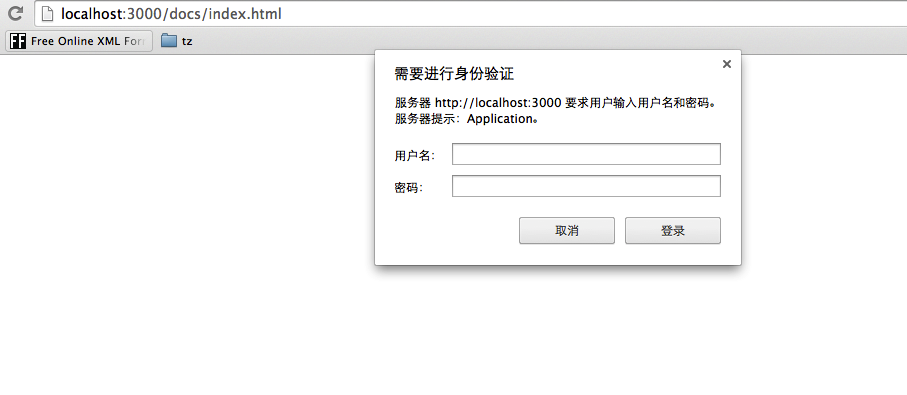
提示需要输入用户名和密码,我们输入正确的用户名 (doc_reader) 和密码 (123123) 后就可以正常访问文档了,
Discussion
No comments yet